TL;DR: top web search MCP servers for Claude, Cursor, Codex and more
| Server | What it does |
|---|---|
| Firecrawl MCP | Search, scrape, crawl, browser automation, and autonomous research agent |
| WebSearch-MCP | Self-hosted web search with full privacy, no external API required |
| Tavily MCP | Real-time web search and content extraction for AI agents |
| Exa MCP | Web search and page fetching with advanced filters and a generous free plan |
| Brave Search MCP | Independent 40B+ page index with privacy-first web, local, and news search |
Most AI assistants are frozen at their training cutoff. They can tell you what was true six months ago, but they cannot tell you what changed last week.
Real-time web search MCP servers fix that. They connect your AI coding tools directly to the live web so the model can look things up mid-task, without you having to copy-paste documentation or news articles in manually. They are also becoming the go-to context layer for AI agents: the tool the model calls when its own knowledge runs out.
The catch is that your agent is only as good as the data it retrieves. Search quality has become a real pain point for developers building production agents: shallow snippets and stale results flow directly into degraded model output. The choice of search tool matters more than it might seem.
I have been using MCP servers for web access across Claude Code, Cursor, Codex CLI, and other tools. The ecosystem has grown fast. There are now dedicated servers covering everything from basic Google-style search to full browser automation and autonomous research agents. This post covers the five I have found most worth recommending, with honest notes on setup friction and where each one falls short.
MCP (Model Context Protocol) is the open standard developed by Anthropic for connecting AI assistants to external tools and data sources. Any MCP client (Claude Code, Claude Desktop, Cursor, Codex CLI, VS Code, Windsurf, and more) can connect to these servers without custom integration work. These are the top web search MCP servers for Claude, Cursor, Codex, and any other MCP client I would hand someone starting today. If you're on Claude and weighing the built-in web search tool against external MCP servers, see Anthropic web search alternatives. If you're on Codex, Codex web search with Firecrawl walks through the exact swap from snippet-only defaults to live results.
What are web search MCP servers?
A web search MCP server is an MCP-compatible process that exposes search and retrieval tools to AI assistants. When an AI like Claude calls firecrawl_search or web_search_exa, the server goes out to the web, fetches results, and returns clean text back to the model.
There are two broad types:
- Hosted remote servers: The server runs in the cloud. You connect via a URL with an API key. No local process to manage.
- Local stdio servers: The server runs on your machine, usually started via
npx. It communicates with the AI client over standard input/output.
Most production-grade options are moving toward remote hosted URLs because they are simpler to maintain, easier to update, and work with any client that supports HTTP transport. For a wider view of what the MCP ecosystem covers beyond search, MCP servers for developers maps out tools for code, databases, memory, and more.
One thing worth knowing before evaluating options: many search APIs marketed at AI agents are wrappers around Google or Bing. If your agent already has a Google tool configured, calling a Google-wrapped MCP server will surface the same ten results. This became more pointed after Microsoft retired the classic Bing Search API, and teams that had built on it scrambled for Bing search API alternatives. The servers that differentiate avoid the wrapper problem by building their own data layer. Exa is a search engine with a neural index. Firecrawl is the all-in-one web data API for AI agents: it searches, scrapes, crawls, and interacts, all in one install. Both use their own indexes rather than re-ranking the same SERP.
The second dimension is how much the server does after returning results. A 2025 survey on agentic deep research found that standard LLMs using basic keyword search score below 10% on complex multi-hop research benchmarks. Systems built around iterative retrieval (search, reason, search again) score dramatically higher.
The difference is not the search engine. It is whether the tool supports a loop. That is the practical distinction between a search-only MCP server and one with an autonomous research agent built in.
Keyword vs. semantic vs. answer engines
Web search MCP servers fall into three broad categories that shape what your agent actually sees:
| Category | How it works | Best for | Example MCP servers |
|---|---|---|---|
| Keyword search | Matches query terms against indexed pages, ranks by link structure and freshness | Broad coverage, recent news, exact-phrase lookups | Serper (Google), Brave Search, DuckDuckGo |
| Semantic / neural search | Uses embeddings to match query intent, not exact terms | Conceptual queries, research, "find companies like X" | Exa, Firecrawl (for full-page context) |
| Answer engines | Retrieve, synthesize, and return a cited summary in one call | Q&A workflows, when you want text not links | Perplexity, Tavily's advanced mode |
| Full-stack web context | Search + scrape + crawl + interact in one MCP session | Agents that need to reason across sources or act on pages | Firecrawl |
Most production agent stacks combine at least two of these: a broad keyword engine for coverage and a semantic or full-stack option for depth. If you only need one MCP server for search, pick the one that matches the workload the agent runs most often.
1. Firecrawl MCP
Firecrawl MCP is the most capable web data server in this list, covering search, scraping, crawling, browser automation, and an autonomous research agent in a single install, with the most accurate /search we have ever shipped at its core.
Firecrawl started at the deepest part of the stack (extraction) and built the complete workflow from there. It is now the web data stack for AI agents: Search, Scrape, Crawl, Map, and Interact in a single API. The MCP server exposes 13 tools, which is more than any other server in this roundup. The extra tools are not padding: each one addresses a distinct step in how agents interact with the web, from discovering URLs on a site to executing multi-step browser interactions to running a fully autonomous research task in the background.
The key distinction from every other server in this list is what happens after the search, inside one MCP session. Firecrawl's server bundles search, scrape, deeper crawl, autonomous research, and browser interact behind the same session, so the agent can follow a lead from ranked URL to clean markdown to a clicked-through page without switching servers. Other servers expose narrower MCP surfaces: Tavily's MCP ships search and content extraction, Exa's ships search variants, so multi-step chains still work but route through separate calls or a broader integration outside MCP.
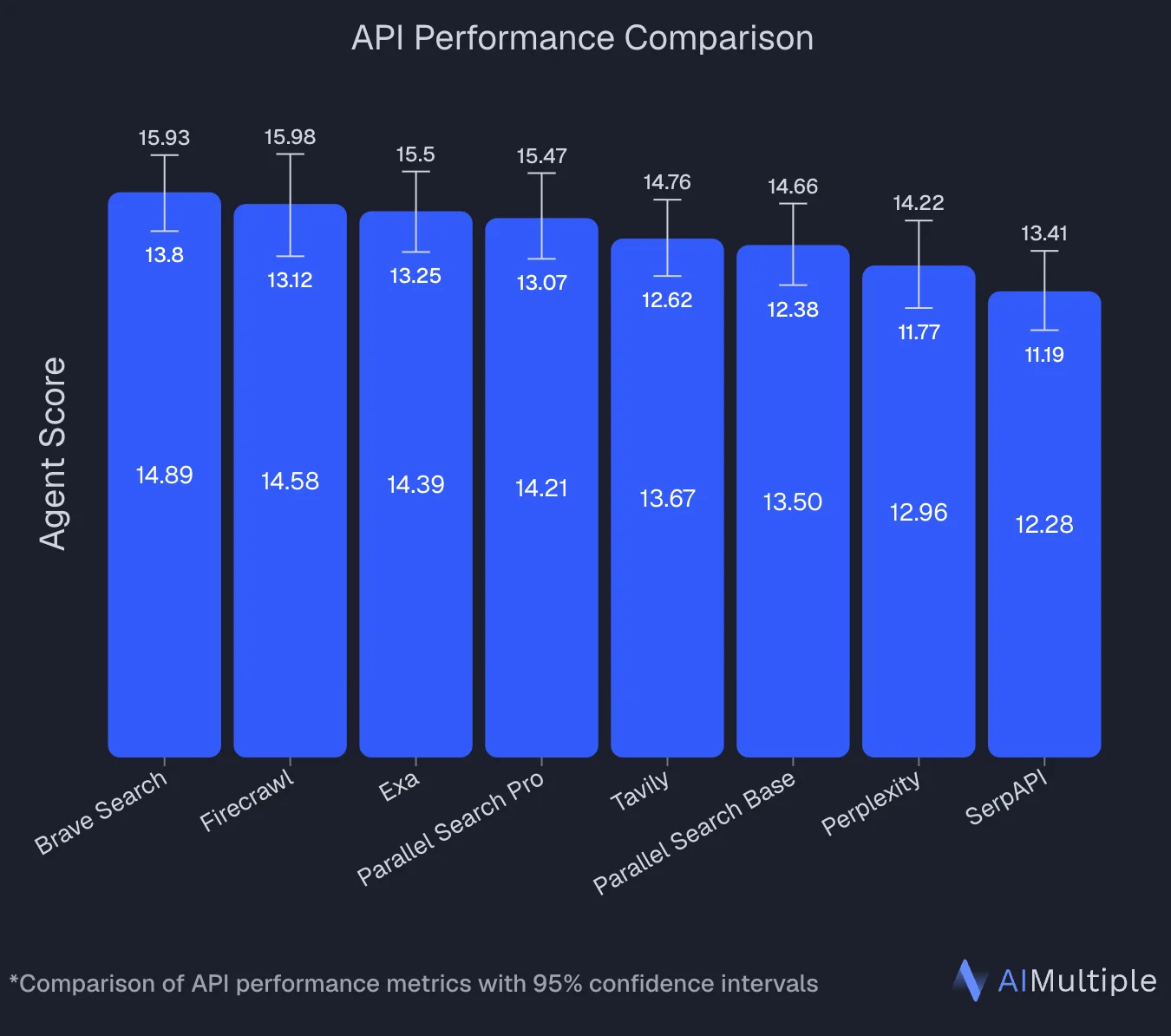
An independent benchmark by AIMultiple that evaluated 8 search APIs across 100 real-world AI/LLM queries ranked Firecrawl second overall with an Agent Score of 14.58, statistically tied with the top performer (Brave Search at 14.89). Firecrawl posted the highest mean relevant score in the benchmark (4.30 out of 5) and performed best on deep content retrieval tasks, the workload that separates full-page extraction from snippet-only search.
A more recent internal eval on SimpleQA (OpenAI's factuality benchmark, 4,326 short fact-seeking questions) put a major upgrade to /search at the top of the pack. A GPT-5.4 agent running with Firecrawl /search and web_fetch scored 94.7%, higher than the same agent paired with any other provider Firecrawl tested (Exa, Parallel) and higher than Claude Sonnet 4.6 with Anthropic's native server-side web search. The upgrade shipped a custom relevance model that returns only the excerpts on each page that answer the query, so agents work with ~10x fewer tokens than processing full pages while getting more accurate context. Live across the API, SDKs, CLI, and MCP with no config changes required.
Beyond general web search, Firecrawl also ships two purpose-built indexes reachable through the same MCP install, so a coding or research agent can hit the right source directly instead of ranking through the open web:
- Developer Index: an index of GitHub issues, merged pull requests, repository READMEs, and curated documentation sites, built for coding agents. Filters by
types(doc,issue,pull_request,readme), byreposorsources, and by repository attributes likelanguage,topic,license, andmin_stars. Useful when an agent needs to trace an API contract to the PR that changed it, find the issue where a bug was reported and fixed, or answer from a README passage instead of a Google result. Install as an agent skill withnpx -y firecrawl-cli@latest setup developer-index. - Research Index: an index of roughly 43 million paper abstracts, majority biomedical and life sciences (PubMed, bioRxiv, medRxiv) alongside arXiv for physics, math, and CS. It exposes a research-specific toolset for searching papers, inspecting metadata, reading passage-level full text, and expanding by citations or references. This is the one to reach for on actual literature work rather than
categories: ["research"]on/search, which only restricts the open web to about 14 academic domains. Install as an agent skill withnpx skills add firecrawl/skills@firecrawl-research-index.
Available tools:
firecrawl_search: Search the web and get back the excerpts that best answer the query. A custom relevance model scores every paragraph, list, and table on each result page and returns only what matters, cutting token cost by roughly 10x compared to processing full pages while topping SimpleQA at 94.7%. Supports time-based filters (qdr:d,qdr:w,qdr:mfor past day/week/month, plus customcdr:1,cd_min:MM/DD/YYYYdate ranges), geographic location targeting, source filters for web, images, or news, andincludeDomains/excludeDomainsrestrictions. It also supports search categories (github,research,pdf), so the same MCP call can search GitHub repos, academic sources (arXiv, Nature, IEEE, PubMed), or PDFs directly, without wiring up separate specialty MCP servers. Query-relevant Highlights come back by default; sethighlights: falsefor raw descriptions instead, or passscrapeOptionsto also get full-page markdown when you need it. Filtering bytypes,repos,language,topic,license, andmin_starsis available over the REST API (api.firecrawl.dev/v2/search/developer); the MCP toolfirecrawl_developer_searchdoes not expose those filters. It ranked #1 overall on the DevDex benchmark at 63.1% Recall@10, so coding agents get the exact PR that fixed a bug or the doc page that answers a how-to instead of a general web result.firecrawl_scrape: Scrape a single URL into clean markdown or structured JSON. Options include JavaScript rendering with a configurablewaitFordelay, mobile viewport simulation, tag inclusion/exclusion filters, and TLS verification control.firecrawl_map: Discover all indexed URLs on a site before deciding what to scrape. Useful for finding the right page before committing to a full crawl.firecrawl_crawl+firecrawl_check_crawl_status: Asynchronous site crawl with configurable depth (maxDiscoveryDepth), page limits, deduplication, and external link filtering. Returns a job ID immediately; poll for results.firecrawl_agent+firecrawl_agent_status: Autonomous research agent that browses the web independently, follows links, and returns structured results. Useful for open-ended research tasks where you do not know which pages to target in advance.firecrawl_interact+firecrawl_interact_stop: Natural language browser interaction on a previously scraped page. Click buttons, fill forms, navigate multi-step flows. Returns aliveViewUrlso you can watch the session in real time.firecrawl_browser_create,firecrawl_browser_execute,firecrawl_browser_delete,firecrawl_browser_list: Persistent browser session management with full CDP (Chrome DevTools Protocol) access. Run Python, JavaScript, or bash in the live browser. Supportsagent-browsercommands for navigation, screenshots, clicking, and typing.
Install:
# Claude Code: remote hosted URL (recommended)
claude mcp add firecrawl --url https://mcp.firecrawl.dev/your-api-key/v2/mcp

# Claude Code: local via npx
claude mcp add firecrawl -e FIRECRAWL_API_KEY=your-api-key -- npx -y firecrawl-mcp
Claude Desktop:
{
  "mcpServers": {
    "firecrawl": {
      "command": "npx",
      "args": ["-y", "firecrawl-mcp"],
      "env": {
        "FIRECRAWL_API_KEY": "YOUR_API_KEY"
      }
    }
  }
}
Cursor:
{
  "mcpServers": {
    "firecrawl-mcp": {
      "command": "npx",
      "args": ["-y", "firecrawl-mcp"],
      "env": {
        "FIRECRAWL_API_KEY": "YOUR-API-KEY"
      }
    }
  }
}
Windsurf (./codeium/windsurf/model_config.json):
{
  "mcpServers": {
    "mcp-server-firecrawl": {
      "command": "npx",
      "args": ["-y", "firecrawl-mcp"],
      "env": {
        "FIRECRAWL_API_KEY": "YOUR_API_KEY"
      }
    }
  }
}
Codex CLI (~/.codex/config.toml):
# Remote (no local dependency)
[mcp_servers.firecrawl]
url = "https://mcp.firecrawl.dev/your-api-key/v2/mcp"

# Local via npx
[mcp_servers.firecrawl]
command = "npx"
args = ["-y", "firecrawl-mcp"]

[mcp_servers.firecrawl.env]
FIRECRAWL_API_KEY = "your-api-key"
Codex also supports the Firecrawl CLI skill as an alternative: npx -y firecrawl-cli@latest init --all --browser registers the tools without touching a config file. See the Codex CLI quickstart for the full setup. Codex's built-in web search returns snippets only, and Codex agents can't browse the web without an additional tool, which is exactly what these config blocks add.
For a step-by-step guide to switching Codex from its stale cached default to live results with Firecrawl, see Codex web search with Firecrawl. For a curated list of the best Codex skills worth adding to your Codex CLI workflow, see the best Codex skills guide.
Example prompts:
# Search with full page content
"Search for the latest OpenAI API pricing changes from the past week"

# Search academic sources via research category
"Search research papers about retrieval-augmented generation from arXiv and IEEE"

# Search GitHub via category filter
"Search github for MCP server implementations in TypeScript"

# Scrape and extract structured data
"Scrape https://docs.example.com and extract all endpoint names, methods, and descriptions as JSON"

# Map then crawl
"Map https://example.com/blog and find all posts published in 2026, then crawl the top 5"

# Autonomous research agent
"Research the current state of MCP server adoption across AI coding tools and return a summary with sources"

# Browser interaction
"Go to https://app.example.com, click Sign In, fill in the form with test credentials, and extract the dashboard data"

# Autonomous agent for structured research
"Research pricing and availability for the top 5 products on https://shop.example.com and return the results as a table"
Honest take: Firecrawl is the right choice when the task involves more than just looking something up. The firecrawl_search tool returns full page content rather than search snippets, which matters for agents that need to reason over what they find rather than just cite a URL. The category filters (github, research, pdf) mean one MCP server covers what would otherwise need three: no separate ArXiv MCP, no separate GitHub search, no separate PDF fetcher. The firecrawl_agent tool handles both open-ended research and structured data retrieval: describe a goal and it figures out which pages to visit, follows links, and returns results. I use it when I need competitive research, documentation summarization, or structured data from sites where the page layout is not stable enough to scrape directly. The firecrawl_interact tool is the most underrated: being able to tell Claude "click the Export button and download the CSV" and have it actually do that in a live browser is a different category of capability than search.
The built-in retry logic with exponential backoff and credit usage monitoring are practical touches: the server handles transient rate limit errors automatically and warns you before you run out of credits, which matters for agentic workflows that might run unattended.
Firecrawl is used by 1.25M+ developers and non-developers across 150,000+ companies, and has served 5B+ requests to date. It has reached that scale because it handles the full workflow (search, scrape, crawl, interact) in a single install, on the real web. Builders who need reliable web context for agentic workflows keep coming back to it, and recommend it to others. Firecrawl also sits at the top of most OpenClaw search provider rankings. Peter Steinberger, founder of OpenClaw, put it plainly:
Cons: The full tool surface is overkill if your use case is simply "give Claude access to Google." The keyless endpoint exposes only search, scrape, and parse, which is the whole surface that job needs. Full reference at docs.firecrawl.dev/mcp-server.
2. WebSearch-MCP
WebSearch-MCP is a self-hosted MCP server that gives you web search without sending your queries to any third-party API.
If data privacy is a constraint (internal queries, proprietary research, or compliance requirements around external API calls), WebSearch-MCP is worth the setup effort. It runs entirely on your own infrastructure using Docker Compose, with a companion crawler service handling the actual web requests. The crawler integrates with FlareSolverr, which handles Cloudflare-protected pages.
The server has 32 GitHub stars as of this writing, so it is a smaller community project rather than an enterprise product. That said, the implementation is clean and the single web_search tool covers the search parameters most agents actually need.
web_search: Search the web with control over result count, language, region, included/excluded domains, excluded terms, and result type (all, news, or blogs).- Docker-based crawler service with FlareSolverr integration for Cloudflare bypass.
API_URLandMAX_SEARCH_RESULTenvironment variables for configuring the server without code changes.- Supports Claude Desktop, Cursor, and Cline as MCP clients.
Install (via Smithery):
npx -y @smithery/cli install @mnhlt/WebSearch-MCP --client claudeSetup the crawler service first (required):
# docker-compose.yml
version: "3.8"
services:
  crawler:
    image: laituanmanh/websearch-crawler:latest
    container_name: websearch-api
    restart: unless-stopped
    ports:
      - "3001:3001"
    environment:
      - NODE_ENV=production
      - PORT=3001
      - LOG_LEVEL=info
      - FLARESOLVERR_URL=http://flaresolverr:8191/v1
    depends_on:
      - flaresolverr
    volumes:
      - crawler_storage:/app/storage
  flaresolverr:
    image: 21hsmw/flaresolverr:nodriver
    container_name: flaresolverr
    restart: unless-stopped
    environment:
      - LOG_LEVEL=info
      - TZ=UTC
volumes:
  crawler_storage:
docker-compose up -dMCP client config:
{
  "mcpServers": {
    "websearch": {
      "command": "npx",
      "args": ["websearch-mcp"],
      "environment": {
        "API_URL": "http://localhost:3001",
        "MAX_SEARCH_RESULT": "5"
      }
    }
  }
}
Example:
"Search for recent TypeScript best practices in news articles"
"Search only on developer.mozilla.org for fetch API documentation"
"Find blog posts about AI agent frameworks from the past month"
Honest take: The self-hosted angle is the whole point. If you are working in a context where all web queries need to stay off third-party infrastructure, this is the only option in this list that delivers that. The FlareSolverr integration is a practical touch: many sites that block scrapers are also the sites you most need to search. The tradeoff is that the setup is non-trivial. You need Docker running, the compose stack healthy, and the MCP server pointed at the right API URL before anything works.
Cons: Not suitable as a quick install. The Docker prerequisite alone rules it out for people who want to get going in under five minutes. A single web_search tool with no scraping or extraction capability means you are getting search snippets, not full page content. The project is small (32 stars), so community support and update frequency are limited compared to the other options here.
Repo: github.com/mnhlt/WebSearch-MCP. Full reference at mcpservers.org/servers/mnhlt/WebSearch-MCP.
3. Tavily MCP
Tavily MCP gives AI agents real-time web search and content extraction, built specifically for the agentic use case and integrated with the major AI orchestration frameworks.
Tavily is a search API designed from the ground up for AI agents rather than humans. The MCP server exposes two focused tools: one for searching the web and one for extracting content from specific URLs. It is a narrower surface area than Firecrawl, but the integration story is strong. Tavily has formal partnerships with Amazon Bedrock AgentCore, Microsoft Azure, IBM watsonx Orchestrate, Snowflake, and Databricks, and first-class integrations with LangChain and LlamaIndex, which makes it the go-to choice in enterprise AI stacks that already use those platforms.
The remote MCP URL makes setup as simple as it gets for Claude Code users: one command and OAuth handles authentication without you managing an API key in the URL.
tavily-search: Real-time web search with support for general queries, news-focused queries, and domain-specific searches. Configurable result count, search depth (basic or advanced), and optional image/raw content inclusion.tavily-extract: Extract the main content from one or more specific URLs, useful when you already know which pages to read and just need clean text.- Remote MCP hosted at
mcp.tavily.comwith OAuth authentication support. - Default parameter configuration via environment variable or HTTP header, so you can set global search depth without specifying it per request.
- Works with Cursor, Claude Desktop, Claude Code, Codex CLI, OpenAI, and any MCP-compatible client.
Install (Claude Code, OAuth):
claude mcp add tavily-remote-mcp --transport http https://mcp.tavily.com/mcp/Install (Claude Code, API key in URL):
claude mcp add tavily-remote-mcp -- npx -y mcp-remote https://mcp.tavily.com/mcp/?tavilyApiKey=YOUR_API_KEYLocal install (Claude Desktop):
{
  "mcpServers": {
    "tavily-mcp": {
      "command": "npx",
      "args": ["-y", "tavily-mcp@0.1.3"],
      "env": {
        "TAVILY_API_KEY": "tvly-YOUR_API_KEY"
      }
    }
  }
}
Example:
"Search for recent developments in quantum computing"
"Search for news articles about AI startups from the last 7 days"
"Search for climate change research on nature.com and sciencedirect.com"
"Extract the main content from https://example.com/article"
Honest take: The OAuth flow for Claude Code is a genuinely good developer experience: no API key in config files, no copy-pasting long strings. Tavily's platform covers /search, /extract, /crawl, /map, and /research; the MCP server itself surfaces the search and extract tools, which is intentionally minimal to keep the MCP surface clean. For crawl, map, or research use cases, teams typically call those endpoints directly rather than through this MCP server.
Cons: The MCP surface (search plus extract) is narrower than Firecrawl's 14 tools. Browser interaction and autonomous agent mode aren't exposed here; if your agent needs those inside a single MCP session, you'll need to compose them from Tavily's other endpoints or reach for a different server. API key management is required for most setups outside the OAuth path, and the API key must include the tvly- prefix to be valid.
4. Exa MCP
Exa MCP connects AI assistants to Exa's neural search and page-fetching tools, with a generous free plan and one of the broadest client compatibility lists in the MCP ecosystem.
Exa approaches search differently from traditional keyword engines, positioning itself as a search tool optimized for AI agents rather than human browsing. The MCP server is available at a remote URL (mcp.exa.ai/mcp) and works with more AI tools than any other server in this list: Cursor, VS Code, Claude Code, Claude Desktop, Codex, OpenCode, Windsurf, Zed, Gemini CLI, Google Antigravity, v0 by Vercel, Warp, Kiro, and Roo Code.
For Claude Desktop specifically, Exa is available as a native Connector. You can add it without touching a config file, just through the Claude Desktop UI.
web_search_exa: Search the web for any topic and get clean, ready-to-use content. Enabled by default.web_fetch_exa: Read a webpage's full content as clean markdown from one or more URLs. Enabled by default.web_search_advanced_exa: Advanced web search with full control over category filters, domain restrictions, date ranges, highlights, summaries, and subpage crawling. Optional, enabled via thetoolsURL parameter.- Remote URL:
https://mcp.exa.ai/mcp, which works without an API key on the free plan. - API key support for production use, passed via
x-api-keyheader or environment variable. - Open source on GitHub at
exa-labs/exa-mcp-server.
Install (Claude Code):
claude mcp add --transport http exa https://mcp.exa.ai/mcpInstall (Cursor / mcp.json):
{
  "mcpServers": {
    "exa": {
      "url": "https://mcp.exa.ai/mcp"
    }
  }
}
Install with API key for production:
{
  "mcpServers": {
    "exa": {
      "url": "https://mcp.exa.ai/mcp",
      "headers": {
        "x-api-key": "YOUR_EXA_API_KEY"
      }
    }
  }
}
Install via npm (for stdio clients):
{
  "mcpServers": {
    "exa": {
      "command": "npx",
      "args": ["-y", "exa-mcp-server"],
      "env": {
        "EXA_API_KEY": "your_api_key"
      }
    }
  }
}
Example:
"Search for recent developments in AI agents and summarize the key trends"
"Find Python examples for implementing OAuth 2.0 authentication"
"Fetch the full content of https://exa.ai and summarize what the company does"
Honest take: The free plan with no API key required is the lowest-friction entry point of any server in this list: paste the URL into your MCP config and you are running in under a minute. The client compatibility list is genuinely impressive for teams that work across multiple AI tools. The web_search_advanced_exa tool, when enabled, gives meaningful control over search scope (domain restrictions, date ranges, category filters) that makes it more than a basic Google wrapper. Exa's agent-focused search approach also tends to surface more relevant results for semantic queries where exact keyword matching would fail. For a broader comparison of AI search engines for agents beyond the MCP layer, that post covers Exa alongside Tavily, Perplexity Sonar, and others.
Cons: The free plan has rate limits, and hitting a 429 error without an API key set up is friction you will encounter if you use it heavily. The advanced search tool is opt-in rather than default, which means you need to know it exists and configure the URL parameter to enable it. The tool naming (web_search_exa, web_fetch_exa) is more verbose than necessary.
5. Brave Search MCP
Brave Search MCP is a privacy-first search server backed by an independent index of 40B+ pages, with no Google or Bing backend behind it.
Brave built its own crawler and search index instead of proxying results from Google or Bing, which puts it in a small club (Firecrawl and Exa are the other two servers in this roundup that avoid the wrapper problem). In AIMultiple's independent benchmark across 100 real-world AI/LLM queries, Brave Search actually placed first with an Agent Score of 14.89, statistically tied with Firecrawl at 14.58. If your agent needs broad keyword coverage without ads or tracking, and you would rather not send queries to a Google-wrapped API, Brave is a real option.
The official Brave Search MCP server is maintained by Brave directly and works with Claude Code, Cursor, Codex CLI, and any other MCP-compatible client. It exposes a small, focused set of tools that map directly onto Brave's public search endpoints.
Available tools:
brave_web_search: General web search with support for pagination, count limits, and freshness filters.brave_local_search: Local business and place search (restaurants, services, points of interest) with location targeting.brave_news_search: News-focused results with recency ranking and per-result publish dates.brave_summarizer: Optional AI-generated summary of top results (available on paid tiers), useful when you want a synthesized answer instead of a link list.- Independent 40B+ page index with no tracking or personalization.
- LLM-optimized response format that returns pre-chunked, context-ready payloads instead of raw SERP snippets.
Install (Claude Code, remote HTTP):
claude mcp add brave-search --transport http https://mcp.brave.com/mcp --header "X-Subscription-Token: YOUR_BRAVE_API_KEY"Install (Claude Desktop / Cursor, local stdio):
{
  "mcpServers": {
    "brave-search": {
      "command": "npx",
      "args": ["-y", "@brave/brave-search-mcp-server"],
      "env": {
        "BRAVE_API_KEY": "YOUR_BRAVE_API_KEY"
      }
    }
  }
}
Codex CLI (~/.codex/config.toml):
[mcp_servers.brave-search]
command = "npx"
args = ["-y", "@brave/brave-search-mcp-server"]

[mcp_servers.brave-search.env]
BRAVE_API_KEY = "YOUR_BRAVE_API_KEY"
Example:
"Search Brave for the latest EU AI Act guidance and return the top 5 results"
"Find local coffee shops in San Francisco with high ratings"
"Search recent news about semiconductor export policy from the past week"
"Get a summarized answer about the 2026 changes to Section 174 R&D tax treatment"
Honest take: Brave is what I reach for when I want broad keyword coverage without an ad-driven engine or tracking pixel on every result. The independence of the index matters. If your agent already has a Google tool wired up elsewhere and you add another Google-wrapped MCP, you get the same ten results twice. Brave gives you a genuinely different lens on the same query. The brave_local_search and brave_news_search tools are also more useful than they sound, especially for agents that answer questions about physical businesses or recent events where the general web index falls short.
Cons: The index is smaller than Google's, so niche or long-tail queries can miss results that Serper would find. The API is priced per query (around $5 per 1,000 for the Data for AI plan) with no fully-free hosted MCP tier, so it is not a zero-cost drop-in like DuckDuckGo. And the tool surface is search-only: no scraping, no page fetching, no interact, so multi-step research chains still need a companion server like Firecrawl.
For a broader comparison against other independent indexes and Google-backed alternatives, see Brave Search API alternatives.
More web search MCP servers worth knowing
The five above cover the workloads I hit most often, but the ecosystem is wider than that. Six more come up in team stacks worth flagging:
6. Perplexity MCP
The Perplexity MCP server exposes Perplexity's Sonar API, so instead of returning raw results the tool returns a synthesized answer with inline citations. Best when your agent's job is to summarize rather than surface links. It fits Q&A assistants, research helpers, and any workflow where you would otherwise burn a second LLM call to summarize search output.
7. Serper MCP
Serper MCP is a Google Search wrapper with organic, news, image, and Shopping results, plus zip-code-level geotargeting. It is the fastest way to give an agent Google's index without setting up a full Custom Search Engine. Free tier covers 2,500 queries. Worth knowing: if you are already using Google-backed search elsewhere, this MCP will surface the same results.
8. Jina AI MCP
Jina's MCP server is a URL reader, not a search engine. You hand it a link and it returns clean, boilerplate-free text ready for the model. Useful as a lightweight companion when your agent already knows which pages to read and just needs the content ingested cleanly.
9. Linkup MCP
Linkup MCP combines web query execution and page fetching in a single MCP call, so the agent gets ranked results with body text rather than just a link list. Sits between Serper (search only) and Firecrawl (full stack) in scope.
10. Kagi MCP
The Kagi MCP server surfaces Kagi's ad-free, ranking-forward search results plus its Universal Summarizer and FastGPT tools. Requires an active Kagi developer plan, but the payoff is noticeably cleaner input than any ad-driven engine. Good for research agents where result noise is a real cost.
11. DuckDuckGo MCP
DuckDuckGo MCP is free, key-free, and configuration-free. Rate limits are modest, but for local agent prototyping or intermittent lookups it is the fastest way to add web search to an MCP client without any signup step.
Building the top web search MCP servers into your workflow
The servers in this list are not mutually exclusive. The combination that works best for most AI engineering workflows is Firecrawl for deep web tasks paired with Exa for quick semantic queries. Tavily fits AI search and research workflows, particularly for teams already running LangChain or LlamaIndex where its integrations are first-class. WebSearch-MCP is the right call when sending queries to external APIs is not an option.
Narrower-scoped MCP servers (Tavily, Exa, Brave Search, WebSearch-MCP) are good for information retrieval: answering questions, finding documentation, pulling recent news. Tavily's MCP adds content extraction alongside search, and its underlying platform also exposes crawl, map, and research endpoints outside MCP. Brave brings an independent index for teams that want to avoid Google-wrapped results. If your agent mostly asks questions, any of these works. For the wider picture of search tools for AI agents outside the MCP layer, the dedicated roundup covers Serper, SerpAPI, and other search APIs alongside these MCP servers.
If the task involves multiple unknowns, uncertain starting points, or synthesis across sources, the iterative approach matters. The research on agentic deep research describes this as "autonomous reasoning, iterative retrieval, and information synthesis in a dynamic feedback loop", which maps directly to firecrawl_agent and does not describe what a single-pass search API does. If it needs to act on web data, Firecrawl is the right tool.
For a broader comparison of AI search engines for agents beyond the MCP layer, that post covers Tavily, Exa, Perplexity Sonar, and others in detail. For teams that need dedicated deep research APIs for multi-step agentic workflows, that post covers tools built specifically for autonomous research at scale.
Cost is a practical consideration that comes up constantly in developer discussions. Exa's free-tier remote URL requires no API key. WebSearch-MCP has no per-query cost once your Docker stack is running. Firecrawl and Tavily both have free tiers but shift to usage-based pricing as volume grows.
All five servers implement the open MCP standard, so installing one today does not lock you out of switching later. Most MCP clients support multiple servers simultaneously, so you can run Firecrawl alongside Exa and Brave and let the agent choose based on what the task requires.
For more on how AI agents use web data, the posts on building an AI research agent with Firecrawl and how MCP compares to other agent protocols cover the broader ecosystem well. The Firecrawl MCP server docs are the fastest place to get running if you want a single install that covers all the use cases above.
Frequently Asked Questions
What is a web search MCP server?
A web search MCP server is a Model Context Protocol server that gives AI assistants like Claude real-time access to the web. Instead of relying on training data, the AI can query live web pages, news, and search results directly during a conversation or agentic task.
Do web search MCP servers require an API key?
Most use one. Tavily and Exa use API keys tied to their respective services, and Firecrawl supports an API key too but also lets you start without one, then add a key for higher rate limits. WebSearch-MCP goes furthest: it is self-hosted and does not require an external API key, but it does require you to run your own Docker-based crawler service.
Which web search MCP server works with Claude Code?
All five servers listed here work with Claude Code. Firecrawl, Tavily, Exa, and Brave Search all support remote MCP via HTTP, so you can add them with a single claude mcp add command. WebSearch-MCP uses stdio transport and requires the local crawler service to be running first.
Can I use these MCP servers with Cursor, Codex, or VS Code?
Yes. Firecrawl, Tavily, and Exa all support Cursor, Codex CLI, and VS Code. For Codex CLI you add the server in ~/.codex/config.toml (remote URL or local via npx). Exa also works with Windsurf, Zed, Gemini CLI, [Google Antigravity](https://www.firecrawl.dev/blog/antigravity-skills), v0 by Vercel, Warp, Kiro, and Roo Code. WebSearch-MCP works with Cursor, Claude Desktop, and Cline.
What is the Firecrawl MCP server?
The Firecrawl MCP server exposes 13 tools covering web search, scraping, crawling, browser session management, and an autonomous research agent. It supports both a remote hosted URL and local npx installation, and works with Claude Code, Cursor, Codex CLI, VS Code, Windsurf, and n8n.
Is there a free web search MCP server?
Yes, several. Firecrawl has a keyless mode at https://mcp.firecrawl.dev/v2/mcp that exposes Search, Scrape, and Parse with no account required (rate-limited per IP). Exa offers a generous free plan that lets you use the MCP without an API key (lower rate limits on the free plan). WebSearch-MCP is entirely free and self-hosted. Tavily has a free tier but requires account registration.
What is the difference between Tavily MCP and Exa MCP?
Tavily MCP provides two tools: web search and content extraction, with a focus on real-time information for AI agents and strong integrations with LangChain, LlamaIndex, and enterprise platforms. Exa MCP offers three tools including an advanced search mode with category filters, date ranges, and domain restrictions, and is available as a native Claude Connector requiring no config file changes.
Can I self-host a web search MCP server?
Yes. WebSearch-MCP is fully self-hosted using Docker Compose. Firecrawl also supports self-hosted deployments for both the MCP server and the underlying scraping infrastructure.
Does the choice of web search MCP server affect my agent's output quality?
Yes, significantly. Research on agentic information retrieval has found that standard LLMs using basic keyword search score below 10% on complex multi-hop research benchmarks, while systems built around iterative retrieval (where the agent searches, reasons over results, and searches again) score dramatically higher. The search tool is the foundation your agent reasons on, so shallow snippets or stale results flow directly into lower-quality output.
Are most web search MCP servers just wrappers around Google or Bing?
Many are, which is worth knowing before you choose. If your agent already has a Google tool configured, calling a Google-wrapped MCP server will return the same results. Exa uses its own neural search index optimized for AI agents, and Firecrawl retrieves full page content rather than re-ranking standard search results. WebSearch-MCP runs its own crawler infrastructure. Tavily crawls independently across multiple sources rather than proxying a single engine.
Which web search MCP server is best for deep research versus quick lookups?
For quick lookups (answering a question, finding documentation, pulling recent news), Exa or Tavily are the fastest options with minimal setup. For deep research tasks involving multiple unknowns, uncertain starting points, or synthesis across many sources, Firecrawl's autonomous research agent (firecrawl_agent) is the better fit. It follows links, reasons over what it finds, and iterates until it has a complete answer, closer to the agentic deep research paradigm than a single-pass search tool.
What is the difference between keyword search, semantic search, and answer engines in MCP servers?
Keyword search MCP servers (Serper for Google, Brave, DuckDuckGo) match query terms against indexed pages and rank by link structure. Semantic or neural search MCP servers (Exa, Firecrawl for full-page context) use embeddings to match the intent of the query, so 'find AI startups doing hardware in NYC' returns relevant companies rather than pages containing those exact words. Answer engines (Perplexity, Tavily's advanced mode) go one step further and return a synthesized, cited summary instead of a list of results. Most production agent stacks use a mix.
Which web search MCP servers work without an API key?
Exa's remote MCP URL works without an API key on the free tier (with rate limits). DuckDuckGo MCP is completely key-free. WebSearch-MCP is self-hosted so there is no external key to manage, though you do need to run the Docker crawler. Firecrawl also offers a keyless mode at https://mcp.firecrawl.dev/v2/mcp exposing Search, Scrape, and Parse rate-limited per IP. Perplexity, Tavily, Serper, Kagi, Linkup, and Brave all require API keys.
Which web search MCP server is best for privacy-focused use cases?
Kagi MCP (ad-free ranking with a paid subscription that funds the search), Brave Search MCP (independent index, no tracking), and WebSearch-MCP (self-hosted, queries never leave your infrastructure) are the three strongest options. DuckDuckGo MCP is another privacy-friendly free choice for lightweight lookups. For enterprise teams with strict data handling requirements, Firecrawl's /search endpoint offers Zero Data Retention (ZDR) modes (end-to-end or anonymized) via the enterprise parameter, so queries and results are never stored server-side. Which one fits depends on whether you want no third party at all (WebSearch-MCP), a privacy-forward hosted engine (Brave, Kagi), a compliance-grade contract (Firecrawl ZDR), or just no user tracking (DuckDuckGo).
Is there a search MCP server that returns citations and sources rather than links?
Yes. Perplexity MCP is the clearest fit. It returns a synthesized answer with inline citations sourced from the web. Tavily's advanced search mode also surfaces sources alongside the response. If you need cited output but also want raw page content available, pairing Firecrawl (for scraping the cited pages) with one of these answer engines is a common pattern.